

When someone lands on your LinkedIn profile, they usually decide within seconds whether to keep reading or move on. Before they look at your experience or scroll through your posts, they’ll see your name and headline. That’s why looking at strong LinkedIn headline examples can be useful. Not to copy them directly, but to understand how a good headline quickly explains what someone does, who they help, and why it matters.
The issue is that many LinkedIn headlines don’t do the job they’re meant to do. They default to job titles, company names, or lists of skills, but don’t clearly explain the value behind the person or business.
Your LinkedIn headline is a small section of your profile, but it carries a lot of weight. It should quickly communicate your focus and give the right people a reason to explore further.
In this blog, we’ll break down what makes an effective headline for LinkedIn, what to include, and share some LinkedIn headline examples to help you structure one that feels clear, relevant, and easy to understand.
What Is A Headline on LinkedIn?
A LinkedIn headline is the short line of text that appears directly underneath your name on your profile. It’s one of the most visible parts of LinkedIn and follows you across the platform.
It appears in search results, comments, connection requests, and messages, which means people often see it before they ever click through to your profile. Because of that, it should give a quick, clear sense of what you do and who you help, without needing extra context.
Why Your LinkedIn Headline Matters
Your headline is often the first real introduction someone gets to you on LinkedIn. Whether they find you through search, see your comment on a post, or receive a connection request, the headline is what shapes their first impression.
A common mistake is treating it as a job title field. That usually leads to something accurate but uninformative, especially if your role title doesn’t explain the value of what you do.
A stronger headline gives context. It helps people immediately understand where you sit, what you focus on, and whether your work is relevant to them.
Headline Character Limit
LinkedIn gives you up to 220 characters for your headline, which is usually enough space to communicate your role clearly without needing to overload it with detail.
You don’t need to use all of it. In fact, trying to fill every character often leads to a headline that feels cluttered and harder to read. Instead, aim for clarity. Focus on your role, your audience, and the value you deliver, and let that guide what you include.
LinkedIn allows you to edit this section directly from your profile settings, making it easy to update as your positioning changes. If you need guidance on where to make those changes, LinkedIn’s own help centre explains how to edit your headline for LinkedIn within your profile settings
What To Put In A LinkedIn Headline
A useful way to think about your headline is to answer three simple questions:
- What do you do?
- Who do you help?
- What outcome do you create for them?
A simple structure that works well is:
‘I help X do Y with Z’
For example:
“I help SaaS founders turn LinkedIn content into consistent inbound leads”
This works because it’s specific, outcome-led, and immediately understandable without needing context about the person.
The exact wording will vary depending on your role, but the principle stays the same. If someone reads your headline in isolation, they should still understand the value you offer.
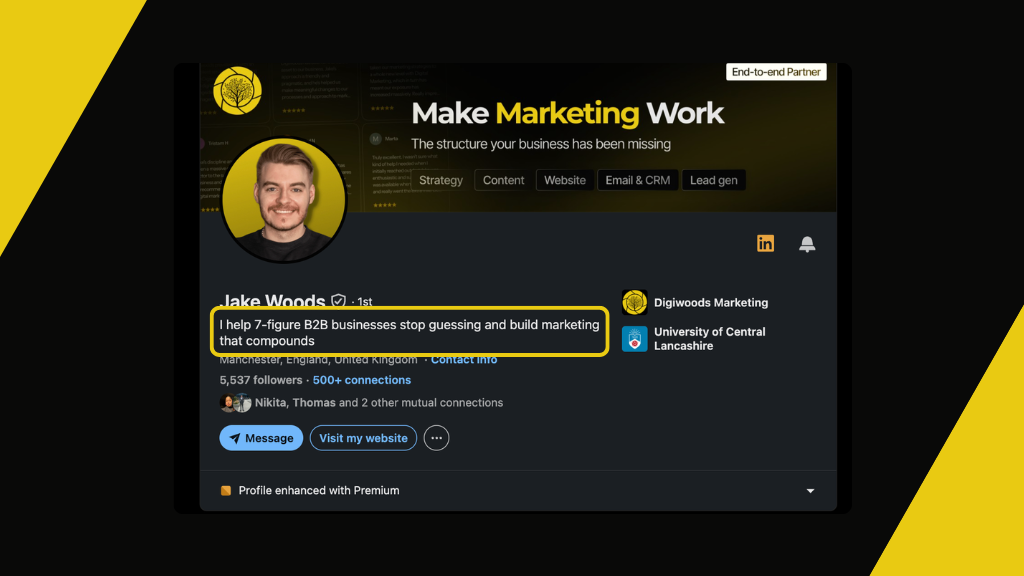
My own LinkedIn headline follows this same formula:
- What do I do?
I help businesses stop guessing with their marketing and remove the complexity. - Who do I help?
Seven-figure B2B businesses. - What outcome do I create?
I help them build marketing systems that compound over time.
LinkedIn Headline Examples
A strong LinkedIn headline doesn’t need to be clever or complex. The best ones are usually very direct. Think less about sounding impressive and more about being instantly understandable to the right audience.
For example:
- Helping SaaS founders generate inbound leads through LinkedIn content
- Marketing consultant helping B2B companies improve online visibility and lead quality
- Helping recruiters attract better candidates through personal branding on LinkedIn
Each one makes it clear who the person works with and what outcome they focus on.
Writing a stronger headline is a great first step, but it’s most effective when it’s supported by a clear LinkedIn B2B marketing strategy that helps your business stay visible and build trust over time.
How To Write A Strong LinkedIn Headline
A useful starting point is to simplify your current headline down to its core message. Strip out anything that doesn’t directly help explain what you do or who you work with.
Once that core message is clear, think about how your headline fits with the rest of your profile and the wider team. Key people in the business should not all sound identical, but their headlines should work together. Each person’s headline should make it clear what they focus on and how their role supports the wider business.
For business owners, this often becomes part of a broader LinkedIn upskilling strategy. Rather than treating LinkedIn as something only one person uses, the whole team understands how to use the platform properly, show up consistently, and support business growth through stronger individual profiles.
Once your headline clearly communicates who you help and what you do, the next step is making sure the rest of your profile supports that message. Your LinkedIn Featured section is a useful place to highlight content, resources, and proof points that reinforce your positioning. For businesses, this same principle applies to company pages too, where elements such as your company page banner help create a consistent and professional first impression.
Final Thoughts
Your LinkedIn headline plays a much bigger role than most people realise. It’s often the first thing someone reads, and it shapes how the rest of your profile is interpreted.
A clear headline makes it easier for the right people to recognise what you do and decide whether to engage further. In most cases, simplicity and specificity will take you further than trying to be creative or comprehensive.