

If you spend any time on LinkedIn, you’ve probably noticed that some profiles stand out immediately. More often than not, that comes down to how they use the LinkedIn featured section. It sits prominently in the middle of your profile and is usually one of the first areas people engage with after your headline.
Despite this, it’s still commonly overlooked or underused. This guide breaks down what the featured section is, how to set it up, and how to use it in a way that actually strengthens your profile.
What Is The LinkedIn Featured Section?
The LinkedIn profile featured section is a dedicated area on your profile where you can highlight selected content. This can include posts, articles, external links, media, or documents, depending on what best represents your work.
It works as a curated highlight reel. Instead of expecting visitors to scroll through your activity or guess what matters most, you’re actively guiding them towards the content you want them to see first.
That becomes especially useful if you’re using LinkedIn for business development, personal branding, or lead generation.
How To Add Featured Section On LinkedIn
Adding the featured section is straightforward once you know where it sits within the profile layout.
Go to your LinkedIn profile and scroll to the “Featured” area. If it isn’t already visible, it can be added by selecting “Add Profile Section” near the top of your profile, then choosing “Recommended” and selecting “Add Featured” as shown below:
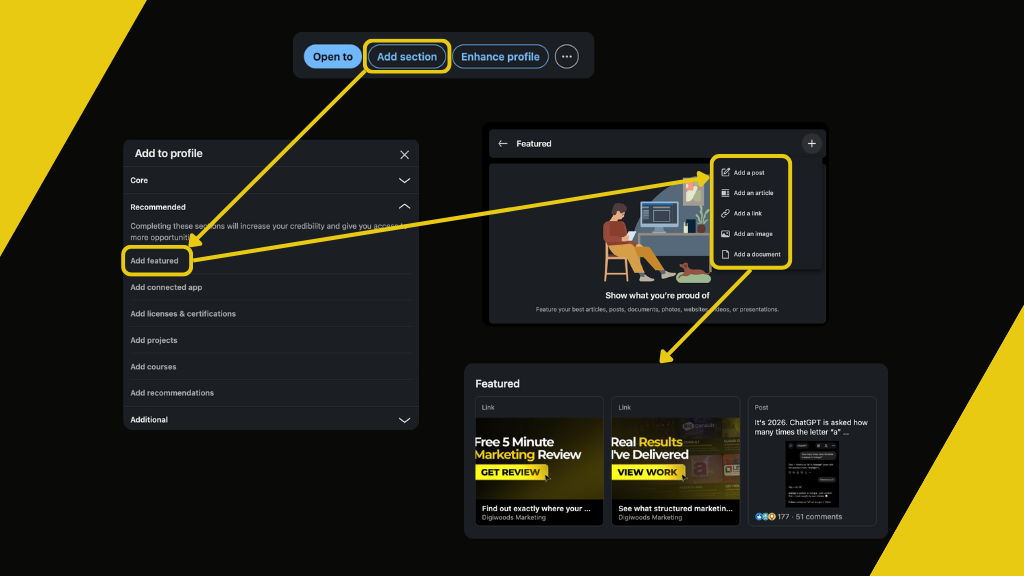
From there, you can start adding content such as:
- Posts you’ve created
- Links to external websites
- Uploaded media like PDFs or presentations
Once you’ve added content, you can reorder, replace, or update items at any time, making it easy to keep the section aligned with your current priorities.
What To Include
This is where the feature is often either overthought or underused. The key principle is simple: everything included should have a purpose.
A strong featured section balances credibility with direction. That means showing proof of what you do while also guiding visitors towards what you’d like them to do next.
Common examples include:
- A lead magnet such as a guide, checklist, or resource
- A case study or video that demonstrates real work
- A high performing post that reinforces social proof
If you only include one item, it should be something that encourages action. If you include more, the balance between value and credibility becomes more important than quantity. One of the most common mistakes is overfilling the section. Adding too many items can weaken the visual hierarchy and make it harder for any single piece of content to stand out. In practice, a smaller number of highly relevant items almost always performs better than a broad mix of content. Visitors should be able to understand who you help, what you do, and why it matters within a few seconds of landing on your profile.
This works best when your featured content supports the wider message across your profile. Before someone explores your featured section, they’ll usually see your name, headline, and profile introduction first, so these areas should work together.
For consultants and business owners, a lead magnet is often the most effective starting point. That might be a downloadable guide, checklist, or short resource that offers immediate value. From there, a supporting credibility piece such as a case study or testimonial helps reinforce trust.
If you regularly publish content, featuring one of your strongest posts can also be a useful signal of authority. High engagement posts often act as social proof and encourage deeper exploration of your profile.
When using featured content to generate enquiries, align it with the wider team LinkedIn upskilling strategy. A strategy like this helps systemise how visitors move more smoothly between your profile, website, and wider business services.
LinkedIn Featured Section Image Size Considerations
There isn’t a single fixed size that works in every case, as layout varies depending on how many items are included and the format used.
For the LinkedIn Featured section, the recommended image dimensions are 480 × 244 pixels when featuring two items. The ideal dimensions will vary slightly depending on the number of items included, so consistency across visuals is more important than exact precision.
If you’re using images or thumbnails, the main priority is visual alignment. Mixed sizing tends to reduce clarity once items sit side by side. It’s also worth avoiding images that contain large amounts of small text, as these can become difficult to read when displayed in the featured section, particularly on mobile devices.
Rather than relying on fixed templates alone, it’s better to test how assets appear once uploaded.
LinkedIn also updates profile layouts periodically, so it’s worth reviewing the featured section every few months to make sure everything still displays correctly and remains relevant. For official guidance on profile features and updates, the LinkedIn Help Centre remains a useful reference point.
Final Thoughts
The LinkedIn featured section is one of the simplest ways to improve how your profile performs without increasing how much content you create. It gives structure to your profile and helps control what people see first.
Instead of filling it with everything you’ve produced, the real value comes from selection. A small number of relevant, intentional pieces will almost always outperform a larger collection of content.
A well-optimised Featured section is an important part of building trust on LinkedIn, but it’s only one piece of the puzzle. To generate consistent visibility and business opportunities, it should form part of a wider LinkedIn B2B marketing strategy that brings together your profile, content, prospecting and advertising into one connected approach.