

Video has quickly become one of the most effective ways for B2B SMEs to build authority on LinkedIn. Whether it’s a CEO sharing insights, an engineer explaining a technical concept, or a team member showcasing company culture, video creates trust in a way that static content often cannot. The challenge is that poorly sized or incorrectly formatted videos can damage credibility just as quickly as well produced videos can enhance it.
Understanding the correct LinkedIn video size ratio is essential for producing content that looks clean, loads correctly, and performs strongly in the feed. This guide outlines everything you need to know including recommended dimensions, accepted formats, thumbnail sizes and upload limits so your videos remain polished and consistent across your LinkedIn presence.
Contents
- LinkedIn Video Dimensions
- LinkedIn Video Specs
- LinkedIn Video Format
- LinkedIn Video Size Limit
- LinkedIn Thumbnail Size
- Choosing the Best LinkedIn Video Size Ratio for B2B Content
- Why Correct Video Size Matters on LinkedIn
- Recommended Tools for Creating LinkedIn-Ready Videos
- Final Thoughts
LinkedIn Video Dimensions
Getting your video dimensions right is the foundation of a professional content workflow. LinkedIn supports several video sizes, but a few formats stand out as the most effective for B2B use.
The most reliable choice for most brands is the 1:1 square ratio. At 1080 x 1080 pixels it fills vertical space on mobile while maintaining a balanced appearance on desktop. This format works especially well for talking head videos, expert insights and short educational clips that SMEs rely on to build authority.
When wider framing is required the 16:9 landscape format is a better fit. At 1920 x 1080 pixels it provides the space needed to present screen recordings, product demonstrations or webinars clearly. This makes it ideal for content where context matters, and the viewer needs to see more than a tight frame.
LinkedIn also supports 9:16 vertical video at 1080 x 1920 pixels. This format is well suited to informal behind the scenes clips or quick updates filmed on a phone. It can be engaging but square video typically performs more consistently across LinkedIn so vertical clips should be viewed as supportive content rather than your primary format.
LinkedIn Video Specs
LinkedIn has specific technical requirements to ensure videos upload smoothly and display correctly. The platform recommends using MP4 or AAC files, a frame rate of 10-60 fps and AAC audio. Videos can range from 3 seconds to 10 minutes, and LinkedIn supports aspect ratios from 1:2.4 through to 2.4:1.
For B2B brands it is best to upload videos at 1080p as a minimum. Anything lower can appear soft or pixelated especially on a desktop monitor, which is still the primary device for many decision makers. As most users browse LinkedIn without sound during the working day, adding captions is essential to ensure your content communicates its message instantly.
LinkedIn Video Format
The best format for LinkedIn is MP4. This format maintains strong visual quality while keeping file sizes manageable which improves upload speed and reduces the risk of errors. When exporting MP4 files use the H.264 codec which ensures reliable playback across different devices and browsers.
LinkedIn Video Size Limit
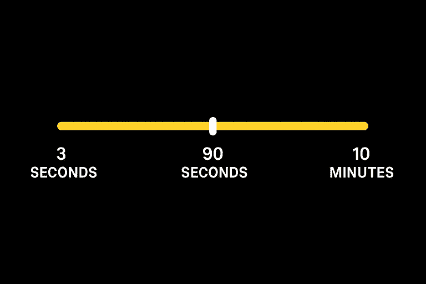
LinkedIn sets clear size limits to promote stable uploads across its platform. Videos must be at least 75KB and can be up to 5GB in size, giving plenty of room for high-quality footage. The platform also allows videos up to 10 minutes long, though engagement tends to drop significantly after the 90-second mark.
The visual below shows how LinkedIn’s video limits compare with where engagement typically peaks.
For SMEs producing educational or industry-specific content, there is still value in longer videos, particularly if repurposing sections of webinars, Q&As or client interviews. However, these should be used strategically. A good rule of thumb is to create one longer video for YouTube or your website, then extract shorter clips (30–60 seconds) for LinkedIn.
LinkedIn Thumbnail Size
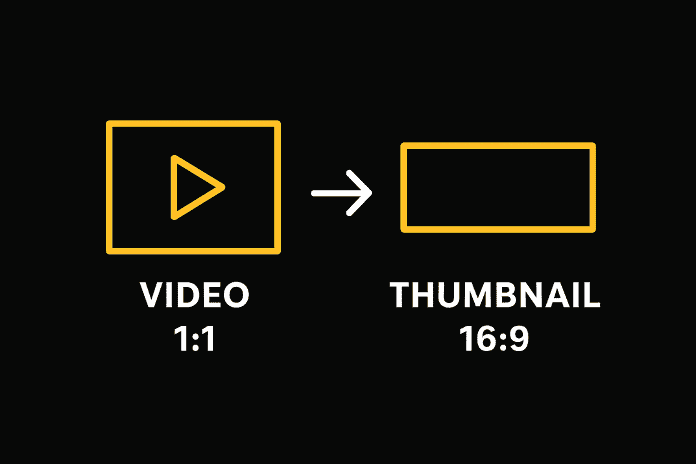
A thumbnail is the first impression of your video and plays a critical role in whether someone chooses to press play. LinkedIn displays video thumbnails at 1280 x 720 pixels (16:9 ratio), even when the video itself is square. This means the thumbnail needs to be clear, well-designed, and visually consistent with your brand.
This simple diagram shows the difference between a 1:1 video and a 16:9 thumbnail, and why they never quite match.
Effective thumbnails tend to be simple with a single subject and minimal text. A clean background, readable wording and subtle brand colours can make your content instantly recognisable without overwhelming the viewer.
Choosing the Best LinkedIn Video Size Ratio for B2B Content
For most SMEs the 1:1 ratio is the most consistent and effective choice. It displays well across all devices and naturally takes up more space in the LinkedIn feed which improves the chance of capturing attention. However, the optimal ratio depends on the content itself.
For example, 16:9 is ideal for more technical or context-heavy content where a wider frame is beneficial to the viewer, who needs to see context, detail or supporting visuals. If your business produces product demos, engineering walkthroughs or data-driven presentations, widescreen video offers clarity that square content cannot match.
Vertical content (9:16) tends to suit more dynamic or informal clips such as culture moments, behind-the-scenes footage, or quick updates filmed on a phone. While vertical might not always outperform square on LinkedIn, it adds authenticity and variety, which can strengthen a brand’s presence when used sparingly.
A strong LinkedIn video strategy often involves using multiple ratios but ensuring that each video is sized deliberately rather than by convenience.
Why Correct Video Size Matters on LinkedIn
Choosing the right size ratio does more than simply make your content look good. It directly impacts performance. Videos that are incorrectly cropped or poorly framed can appear amateur, leading to reduced watch time and lower engagement. Because LinkedIn’s algorithm rewards content that keeps people watching, even small formatting issues can harm your reach.
For B2B SMEs, first impressions matter. Many prospects will encounter your business for the first time through a single post which is often a video. Ensuring your content is well-sized, easy to view and visually consistent reinforces your credibility and helps build trust early in the buying journey.
Recommended Tools for Creating LinkedIn-Ready Videos
Several tools make it easier to export the correct sizes and ratios without much manual work. CapCut and Descript offer templates for 1:1, 16:9 and 9:16 formats, alongside built-in caption generators. Tools like Canva simplify thumbnail design, allowing you to apply your brand guidelines quickly. For more advanced workflows, Adobe Premiere Pro supports precise exports using custom presets. If you’re short on time, CapCut is usually the fastest tool to get content LinkedIn ready.
Final Thoughts
Optimising your LinkedIn video size ratio and dimensions is one of the simplest ways to produce professional, high performing content. It ensures consistent viewing experiences, strengthens brand perception and increases the effectiveness of every video you publish.
If you want polished LinkedIn videos without the time commitment, our Social First Video service is designed for you. Reach out today and take your LinkedIn videos to the next level.